Two-node MariaDB cluster and garb
Building a two-cluster MariaDB with garb (Galera Arbitrator).
MariaDB installed on its own partition.
Steps
1. Building and configuring the database servers
2. Adding a new drive to each of the servers to mount as /var/lib/mysql
3. Installing MariaDB and doing the initial configuration
4. Configuring both nodes for the cluster
5. Adding A and PTR records to DNS for both servers and the cluster VIP
6. Adding all nodes to /etc/hosts
7. Configuring iptables
8. Installing and configuring Galera Arbitrator on a different node
9. Starting the cluster from node 1 (srv20)
10. Installing Clustercheck
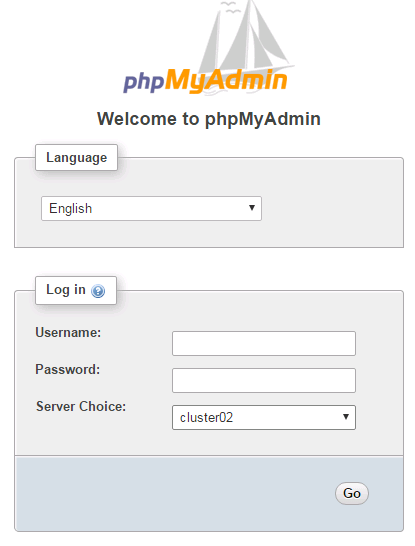
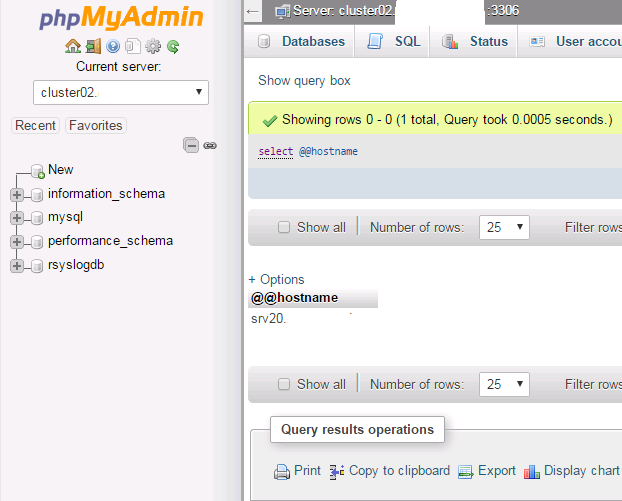
11. Adding both nodes and the VIP to phpMyAdmin
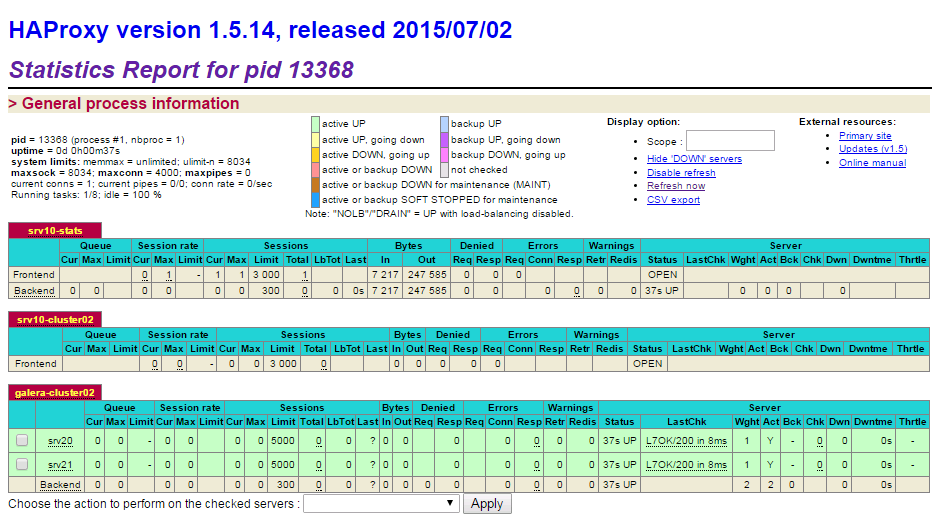
12. Setting up HAProxy for load-balancing
1. Building and configuring the database servers
Database servers:
srv20 - 192.168.122.144 - CentOS 7
srv21 - 192.168.122.145 - CentOS 7
cluster02 - 192.168.122.143
HAProxy servers:
srv10 - 192.168.122.146 - CentOS 7
srv11 - 192.168.122.147 - CentOS 7
Galera Arbitrator (garb)
srv1 - 192.168.122.151 - CentOS 7
yum install epel-release
yum update
/etc/sysconfig/selinux
SELINUX=disabled
systemctl disable NetworkManager
systemctl disable firewalld
systemctl enable network.service
yum install iptables-services
systemctl enable iptables.service
2. Adding a new drive to each of the servers
The drives will be mounted as /var/lib/mysql
[root@srv20 ~]# fdisk /dev/sdb
n
p
1
t
8e
w
The partition table has been altered!
reboot
Create the logical volume and the mount point:
[root@srv20 ~]# pvcreate /dev/sdb1
[root@srv20 ~]# vgcreate -s 32M data /dev/sdb1
[root@srv20 ~]# pvscan && vgscan
[root@srv20 ~]# lvcreate --name data --size 99.95G data
[root@srv20 ~]# pvscan && vgscan && lvscan
  PV /dev/sdb1   VG data    lvm2 [99.97 GiB / 0    free]
  PV /dev/sda2   VG srv20   lvm2 [29.70 GiB / 4.00 MiB free]
  Total: 2 [129.67 GiB] / in use: 2 [129.67 GiB] / in no VG: 0 [0   ]
  Reading all physical volumes.  This may take a while...
  Found volume group "srv20" using metadata type lvm2
  Found volume group "data" using metadata type lvm2
  ACTIVE            '/dev/srv20/root' [28.08 GiB] inherit
  ACTIVE            '/dev/srv20/swap' [1.62 GiB] inherit
  ACTIVE            '/dev/data/data' [99.97 GiB] inherit
[root@srv20 ~]# mkfs.xfs /dev/data/data
[root@srv20 ~]# echo "/dev/data/data /var/lib/mysql  xfs  noatime,nodiratime,nobarrier,logbufs=8 0 0" >> /etc/fstab
[root@srv20 ~]# mkdir -p /var/lib/mysql
[root@srv20 ~]# reboot
[root@srv20 ~]# df -h
Filesystem              Size  Used Avail Use% Mounted on
...
/dev/mapper/data-data   100G   33M  100G   1% /var/lib/mysql
...
3. Installing MariaDB and doing the initial configuration
/etc/yum.repos.d/mariadb.repo
# MariaDB 10.1 CentOS repository list - created 2016-05-07 22:24 UTC
# http://mariadb.org/mariadb/repositories/
[mariadb]
name = MariaDB
baseurl = http://yum.mariadb.org/10.1/centos7-amd64
gpgkey=https://yum.mariadb.org/RPM-GPG-KEY-MariaDB
gpgcheck=1
[root@srv20 ~]# yum install MariaDB-server MariaDB-client rsync galera socat

[root@srv20 ~]# cd /var/lib/mysql/
[root@srv20 mysql]# ls -l
total 110616
-rw-rw---- 1 mysql mysql    16384 Aug 13 11:37 aria_log.00000001
-rw-rw---- 1 mysql mysql       52 Aug 13 11:37 aria_log_control
-rw-rw---- 1 mysql mysql 12582912 Aug 13 11:37 ibdata1
-rw-rw---- 1 mysql mysql 50331648 Aug 13 11:37 ib_logfile0
-rw-rw---- 1 mysql mysql 50331648 Aug 13 11:37 ib_logfile1
drwx--x--x 2 mysql mysql     4096 Aug 13 11:37 mysql
drwx------ 2 mysql mysql       19 Aug 13 11:37 performance_schema
-rw-r----- 1 mysql mysql        0 Aug 13 11:37 srv20.domain.dom.err
drwxr-xr-x 2 mysql mysql        6 Aug 13 11:37 test
[root@srv20 mysql]#

[root@srv20 ~]# systemctl disable mariadb
[root@srv20 ~]# chkconfig mysql off
systemctl start mariadb && systemctl status mariadb
[root@srv20 ~]# /usr/bin/mysql_secure_installation
...
Set root password? [Y/n] Y
New password:
Re-enter new password:
Password updated successfully!
Reloading privilege tables..
 ... Success!
...
Remove anonymous users? [Y/n] Y
 ... Success!
...
Disallow root login remotely? [Y/n] Y
 ... Success!
...
Remove test database and access to it? [Y/n] Y
 - Dropping test database...
 ... Success!
 - Removing privileges on test database...
 ... Success!

Reloading the privilege tables will ensure that all changes made so far
will take effect immediately.

Reload privilege tables now? [Y/n] Y
 ... Success!

Cleaning up...

All done! If you've completed all of the above steps, your MariaDB
installation should now be secure.

Thanks for using MariaDB!
mysql -u root -p
DELETE FROM mysql.user WHERE user='';
GRANT ALL ON *.* TO 'root'@'%' IDENTIFIED BY 'somepassword';
GRANT USAGE ON *.* to sst_user@'%' IDENTIFIED BY 'someotherpassword';
GRANT ALL PRIVILEGES on *.* to sst_user@'%';
FLUSH PRIVILEGES;
exit
4. Configuring both nodes for the cluster
systemctl stop mariadb
/etc/my.cnf.d/server.cnf
On node 1 (srv20)
[galera]
wsrep_on=ON
binlog_format=ROW
default-storage-engine=innodb
innodb_autoinc_lock_mode=2
innodb_locks_unsafe_for_binlog=1
query_cache_size=0
query_cache_type=0
bind-address=0.0.0.0
datadir=/var/lib/mysql
innodb_log_file_size=100M
innodb_file_per_table
innodb_flush_log_at_trx_commit=2
wsrep_provider=/usr/lib64/galera/libgalera_smm.so
wsrep_cluster_address="gcomm://192.168.122.144,192.168.122.145,192.168.122.151"
wsrep_cluster_name='cluster02'
wsrep_node_address='192.168.122.144'
wsrep_node_name='srv20'
wsrep_sst_method=rsync
wsrep_sst_auth=sst_user:someotherpassword
On node 2 (srv21)
[galera]
wsrep_on=ON
binlog_format=ROW
default-storage-engine=innodb
innodb_autoinc_lock_mode=2
innodb_locks_unsafe_for_binlog=1
query_cache_size=0
query_cache_type=0
bind-address=0.0.0.0
datadir=/var/lib/mysql
innodb_log_file_size=100M
innodb_file_per_table
innodb_flush_log_at_trx_commit=2
wsrep_provider=/usr/lib64/galera/libgalera_smm.so
wsrep_cluster_address="gcomm://192.168.122.144,192.168.122.145,192.168.122.151"
wsrep_cluster_name='cluster02'
wsrep_node_address='192.168.122.145'
wsrep_node_name='srv21'
wsrep_sst_method=rsync
wsrep_sst_auth=sst_user:someotherpassword
5. Adding A and PTR records to DNS for both servers and the cluster VIP
Forwarding zone /var/named/domain.dom.lan:
cluster02       IN  A   192.168.122.143
srv20           IN  A   192.168.122.144
srv21           IN  A   192.168.122.145
Reverse zone: /var/named/122.168.192.zone:
143     IN  PTR cluster02.domain.dom.
144     IN  PTR srv20.domain.dom.
145     IN  PTR srv21.domain.dom.
6. Adding all nodes to /etc/hosts
192.168.122.143  cluster02.domain.dom cluster02
192.168.122.144  srv20.domain.dom     srv20
192.168.122.145  srv21.domain.dom     srv21
7. Configuring iptables
iptables -I INPUT 5 -s 192.168.122.0/24 -m state --state NEW -m tcp -p tcp --dport 3306 -j ACCEPT
iptables -I INPUT 6 -s 192.168.122.0/24 -m state --state NEW -m tcp -p tcp --dport 4567 -j ACCEPT
iptables -I INPUT 7 -s 192.168.122.0/24 -m state --state NEW -m tcp -p tcp --dport 9200 -j ACCEPT

iptables-save > /etc/sysconfig/iptables
systemctl restart iptables && systemctl status iptables
8. Installing and configuring Galera Arbitrator on a different node
Installed it on srv1
mkdir galera
cd galera
wget http://yum.mariadb.org/10.1/centos6-amd64/rpms/galera-25.3.15-1.rhel6.el6.x86_64.rpm
galera-25.3.15-1.rhel6.el6.x86_64.rpm
yum install *

rpm -ql galera
/etc/sysconfig/garb
/usr/bin/garb-systemd
/usr/bin/garbd
/usr/lib/systemd/system/garb.service
/usr/lib64/galera
/usr/lib64/galera/libgalera_smm.so
/usr/share/doc/galera
/usr/share/doc/galera/COPYING
/usr/share/doc/galera/LICENSE.asio
/usr/share/doc/galera/LICENSE.chromium
/usr/share/doc/galera/LICENSE.crc32c
/usr/share/doc/galera/README
/usr/share/doc/galera/README-MySQL
/usr/share/man/man8/garbd.8.gz
/etc/sysconfig/garb
# Copyright (C) 2012 Codership Oy
# This config file is to be sourced by garb service script.

# A comma-separated list of node addresses (address[:port]) in the cluster
GALERA_NODES="192.168.122.144:4567,192.168.122.145:4567"

# Galera cluster name, should be the same as on the rest of the nodes.
GALERA_GROUP="cluster02"

# Optional Galera internal options string (e.g. SSL settings)
# see http://galeracluster.com/documentation-webpages/galeraparameters.html
# GALERA_OPTIONS=""

# Log file for garbd. Optional, by default logs to syslog
LOG_FILE="/var/log/garbd.log"
and iptables:
iptables -I INPUT 12 -s 192.168.122.0/24 -m state --state NEW -m tcp -p tcp --dport 4567 -j ACCEPT
iptables-save > /etc/sysconfig/iptables
9. Starting the cluster from node 1 (srv20)
[root@srv20 ~]# galera_new_cluster
[root@srv20 ~]# mysql -u root -p -e "show status like 'wsrep%'"
Enter password:
+------------------------------+--------------------------------------+
| Variable_name                | Value                                |
+------------------------------+--------------------------------------+
| wsrep_apply_oooe             | 0.000000                             |
| wsrep_apply_oool             | 0.000000                             |
| wsrep_apply_window           | 0.000000                             |
| wsrep_causal_reads           | 0                                    |
| wsrep_cert_deps_distance     | 0.000000                             |
| wsrep_cert_index_size        | 0                                    |
| wsrep_cert_interval          | 0.000000                             |
| wsrep_cluster_conf_id        | 1                                    |
| wsrep_cluster_size           | 1                                    |
| wsrep_cluster_state_uuid     | 4286dfd6-6180-11e6-a412-3665d135548b |
| wsrep_cluster_status         | Primary                              |
| wsrep_commit_oooe            | 0.000000                             |
| wsrep_commit_oool            | 0.000000                             |
| wsrep_commit_window          | 0.000000                             |
| wsrep_connected              | ON                                   |
| wsrep_evs_delayed            |                                      |
| wsrep_evs_evict_list         |                                      |
| wsrep_evs_repl_latency       | 0/0/0/0/0                            |
| wsrep_evs_state              | OPERATIONAL                          |
| wsrep_flow_control_paused    | 0.000000                             |
| wsrep_flow_control_paused_ns | 0                                    |
| wsrep_flow_control_recv      | 0                                    |
| wsrep_flow_control_sent      | 0                                    |
| wsrep_gcomm_uuid             | 42860b19-6180-11e6-89d5-ca681fa8a87b |
| wsrep_incoming_addresses     | 192.168.122.144:3306                 |
| wsrep_last_committed         | 0                                    |
| wsrep_local_bf_aborts        | 0                                    |
| wsrep_local_cached_downto    | 18446744073709551615                 |
| wsrep_local_cert_failures    | 0                                    |
| wsrep_local_commits          | 0                                    |
| wsrep_local_index            | 0                                    |
| wsrep_local_recv_queue       | 0                                    |
| wsrep_local_recv_queue_avg   | 0.500000                             |
| wsrep_local_recv_queue_max   | 2                                    |
| wsrep_local_recv_queue_min   | 0                                    |
| wsrep_local_replays          | 0                                    |
| wsrep_local_send_queue       | 0                                    |
| wsrep_local_send_queue_avg   | 0.000000                             |
| wsrep_local_send_queue_max   | 1                                    |
| wsrep_local_send_queue_min   | 0                                    |
| wsrep_local_state            | 4                                    |
| wsrep_local_state_comment    | Synced                               |
| wsrep_local_state_uuid       | 4286dfd6-6180-11e6-a412-3665d135548b |
| wsrep_protocol_version       | 7                                    |
| wsrep_provider_name          | Galera                               |
| wsrep_provider_vendor        | Codership Oy <info@codership.com>    |
| wsrep_provider_version       | 25.3.15(r3578)                       |
| wsrep_ready                  | ON                                   |
| wsrep_received               | 2                                    |
| wsrep_received_bytes         | 144                                  |
| wsrep_repl_data_bytes        | 0                                    |
| wsrep_repl_keys              | 0                                    |
| wsrep_repl_keys_bytes        | 0                                    |
| wsrep_repl_other_bytes       | 0                                    |
| wsrep_replicated             | 0                                    |
| wsrep_replicated_bytes       | 0                                    |
| wsrep_thread_count           | 2                                    |
+------------------------------+--------------------------------------+
[root@srv20 ~]# mysql -u root -p
Enter password:
Welcome to the MariaDB monitor.  Commands end with ; or \g.
Your MariaDB connection id is 7
Server version: 10.1.16-MariaDB MariaDB Server

Copyright (c) 2000, 2016, Oracle, MariaDB Corporation Ab and others.

Type 'help;' or '\h' for help. Type '\c' to clear the current input statement.
MariaDB [(none)]> SHOW STATUS LIKE 'wsrep_cluster_size' ;"
+--------------------+-------+
| Variable_name      | Value |
+--------------------+-------+
| wsrep_cluster_size | 3     |
+--------------------+-------+
1 row in set (0.00 sec)
10. Installing Clustercheck
[root@srv20 ~]# mkdir clustercheck
[root@srv20 ~]# cd clustercheck
[root@srv20 clustercheck]# wget https://raw.githubusercontent.com/olafz/percona-clustercheck/master/clustercheck
[root@srv20 clustercheck]# chmod +x clustercheck
[root@srv20 clustercheck]# mv clustercheck /usr/bin/
[root@srv20 clustercheck]# yum install xinetd
/etc/xinetd.d/mysqlchk
# default: on
# description: mysqlchk
service mysqlchk
{
        disable = no
        socket_type = stream
        port = 9200             # This port used by xinetd for clustercheck
        flags          = IPv4 REUSE
        wait = no
        user = nobody
        server = /usr/bin/clustercheck
        log_on_failure += USERID
        only_from = 192.168.122.146 192.168.122.145
        per_source = UNLIMITED
}
/etc/services
sun-as-jpda     9191/udp                # Sun AppSvr JPDA
#wap-wsp         9200/tcp                # WAP connectionless session service
#wap-wsp         9200/udp                # WAP connectionless session service
mysqlchk        9200/tcp                # mysqlchk
[root@srv20 clustercheck]# systemctl enable xinetd
[root@srv20 clustercheck]# systemctl start xinetd && systemctl status xinetd
mysql -u root -p
GRANT PROCESS ON *.* TO 'clustercheckuser'@'localhost' IDENTIFIED BY 'clustercheckpassword!';
11. Adding both nodes and the VIP to phpMyAdmin
/var/www/html/phpMyAdmin-4.6.2-all-languages/config.inc.php
/**
 * Servers configuration
 */
$i = 0;

/**
 * First server
 */
$i++;
/* Authentication type */
$cfg['Servers'][$i]['auth_type'] = 'cookie';
/* Server parameters */
$cfg['Servers'][$i]['host'] = 'localhost';
$cfg['Servers'][$i]['connect_type'] = 'tcp';
$cfg['Servers'][$i]['compress'] = false;
$cfg['Servers'][$i]['AllowNoPassword'] = false;

/*
 * srv20
 */
$i++;
$cfg['Servers'][$i]['verbose']       = 'srv20 ';
$cfg['Servers'][$i]['auth_type']     = 'cookie';
$cfg['Servers'][$i]['host']          = '192.168.122.144';
$cfg['Servers'][$i]['connect_type']  = 'tcp';
$cfg['Servers'][$i]['port']          = '3306';
$cfg['Servers'][$i]['compress']      = false;
$cfg['Servers'][$i]['extension']     = 'mysqli';

/*
 * dbsrv02
 */
$i++;
$cfg['Servers'][$i]['verbose']       = 'srv21 ';
$cfg['Servers'][$i]['auth_type']     = 'cookie';
$cfg['Servers'][$i]['host']          = '192.168.122.145';
$cfg['Servers'][$i]['connect_type']  = 'tcp';
$cfg['Servers'][$i]['port']          = '3306';
$cfg['Servers'][$i]['compress']      = false;
$cfg['Servers'][$i]['extension']     = 'mysqli';

/*
 * dbsrv03
 */
$i++;
$cfg['Servers'][$i]['verbose']       = 'cluster02 ';
$cfg['Servers'][$i]['auth_type']     = 'cookie';
$cfg['Servers'][$i]['host']          = '192.168.122.143';
$cfg['Servers'][$i]['connect_type']  = 'tcp';
$cfg['Servers'][$i]['port']          = '3306';
$cfg['Servers'][$i]['compress']      = false;
$cfg['Servers'][$i]['extension']     = 'mysqli';
|
|
12. Setting up HAProxy for load-balancing
Added both nodes to config in HAproxy and keepalived .
Testing:
[root@srv4 ~]# mysql -u root -h cluster02 -p
Enter password:
Welcome to the MariaDB monitor.  Commands end with ; or \g.
Your MariaDB connection id is 554
Server version: 10.1.16-MariaDB MariaDB Server

Copyright (c) 2000, 2015, Oracle, MariaDB Corporation Ab and others.

Type 'help;' or '\h' for help. Type '\c' to clear the current input statement.
MariaDB [(none)]> select @@hostname;
+---------------------+
| @@hostname          |
+---------------------+
| srv20.domain.dom |
+---------------------+
1 row in set (0.00 sec)

MariaDB [(none)]> select host from information_schema.processlist;
+---------------------------+
| host                      |
+---------------------------+
| srv10.domain.dom:57244 |
|                           |
|                           |
+---------------------------+
3 rows in set (0.00 sec)

MariaDB [(none)]> SHOW VARIABLES WHERE Variable_name = 'hostname';
+---------------+---------------------+
| Variable_name | Value               |
+---------------+---------------------+
| hostname      | srv20.domain.dom    |
+---------------+---------------------+
1 row in set (0.00 sec)

MariaDB [(none)]> exit
Bye