Mail Server with Postfix, Dovecot
Building a Postfix mail server on CentOS 7.
Steps
01. Server Configuration and design
02. Getting certificates for mai mail servers from Let's Encrypt
03. Installing MariaDB and creating the database
04. Installing Postfix 3.2
05. Configuring Postfix
main.cf
master.cf
virtual directories
virtual maps
06. Installing Dovecot
07. PostfixAdmin on srv4 (management server)
08. Roundcube on the management server (srv4)
09. clamav, amavisd-new, spamassassin
10. HAProxy in front for IMAP
11. spf, DKIM, DMARC
12. Fail2ban
01. Configuration and design
The entire system has one external gateway (srv33), three HAProxy servers (srv10, srv11, srv27), two Postfix relays (srv14 and srv15) and a mail server (srv31) where the emails are stored and from where they are accessed by the users.
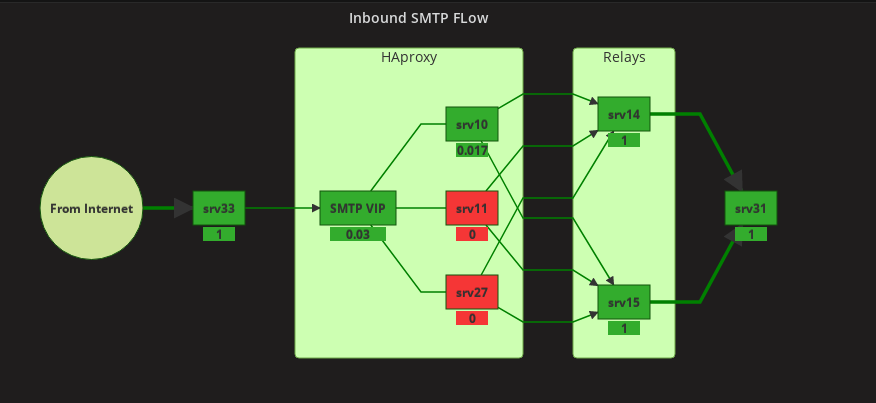
- Only one HAProxy server is active (green), the other two in stand-by (red - no transaction flowing through them).
- Mail server (for now only one) - srv31 (192.168.122.123) with postfix (MTA), dovecot (MDA, IMAP) and database
- For managing postfix accounts - PostfixAdmin on srv4 (management server)
- Webmail with Roundcube (also on srv4)
The mail server
CentOS 7 minimal
A dedicated drive /data for mail storage
Adding A and PTR records to DNS
srv31.mydomain.dom - 192.168.122.123
/etc/sysconfig/selinux - permissive
systemctl disable NetworkManager
systemctl disable firewalld
systemctl enable network.service
yum install iptables-services
yum install net-tools
yum install epel-release
yum update
yum install psmisc net-tools bind-utils
Configuring chrony
Configuring chrony and set it to start at boot
vi /etc/chrony.conf
server 192.168.122.151 iburst
systemctl enable chronyd
systemctl list-unit-files | grep chronyd
chronyd.service                               enabled
02. Getting certificates for mail servers from Let's Encrypt
Will be using the DNS challenge with certbot.
Installing certbot on the mail server (srv31). Will get all the certificate here, then will distribute them to the other servers.
yum install certbot
Domains and names I need on the certificate
- mail.mydomain.dom
- mail1.mydomain.dom
- mail2.mydomain.dom
- mail3.mydomain.dom
- mail4.mydomain.dom
- mail5.mydomain.dom
certbot --cert-name mail.mydomain.dom \
    -d mail.mydomain.dom \
    -d mail1.mydomain.dom \
    -d mail2.mydomain.dom \
    -d mail3.mydomain.dom \
    -d mail4.mydomain.dom \
    -d mail5.mydomain.dom -\
    -agree-tos \
    --email me@mydomain.dom \
    --manual \
    --preferred-challenges dns certonly
Added the required TXT records to DNS then continued. In the end:
IMPORTANT NOTES:
 - Congratulations! Your certificate and chain have been saved at
   /etc/letsencrypt/live/mail.mydomain.dom/fullchain.pem. Your cert
   will expire ...
Checking
cd /etc/letsencrypt/
ls -l
accounts
archive
csr
keys
live
renewal
cd live
ls -l
mail.mydomain.dom

cd mail.mydomain.dom/
mail.mydomain.dom]# ls -l
cert.pem -> ../../archive/mail.mydomain.dom/cert1.pem
chain.pem -> ../../archive/mail.mydomain.dom/chain1.pem
fullchain.pem -> ../../archive/mail.mydomain.dom/fullchain1.pem
privkey.pem -> ../../archive/mail.mydomain.dom/privkey1.pem
README
03. Installing MariaDB and creating the database
The database will be hosted on the mail server (srv31).
Adding the repo:
vi /etc/yum.repos.d/mariadb.repo
[mariadb]
name = MariaDB
baseurl = http://yum.mariadb.org/10.3.0/centos73-amd64/
gpgkey=https://yum.mariadb.org/RPM-GPG-KEY-MariaDB
gpgcheck=1
Installing:
yum install MariaDB-server MariaDB-client
Then:
systemctl start mariadb && systemctl status mariadb
/usr/bin/mysql_secure_installation

Set root password? [Y/n] Y
New password:
Re-enter new password:
Password updated successfully!
Reloading privilege tables..
 ... Success!

Remove anonymous users? [Y/n] Y
 ... Success!

Disallow root login remotely? [Y/n] Y
 ... Success!

Remove test database and access to it? [Y/n] Y
 - Dropping test database...
 ... Success!
 - Removing privileges on test database...
 ... Success!

Reload privilege tables now? [Y/n] Y
 ... Success!

Cleaning up...

Thanks for using MariaDB!
Creating database mail_db:
CREATE DATABASE mail_db;
CREATE USER "mail_user"@"localhost" IDENTIFIED BY "userpass";
GRANT ALL PRIVILEGES ON mail_db.* TO "mail_user"@"localhost";
FLUSH PRIVILEGES;
exit
Enabling remote access
mysql -u root -p
Enter password:
...

MariaDB [(none)]> GRANT ALL ON *.* TO 'root'@'%' IDENTIFIED BY 'root_pass';
MariaDB [(none)]> FLUSH PRIVILEGES;
MariaDB [(none)]> exit
Bye
04. Installing Postfix 3.2
Creating yum repo for Postfix 3.2 on the mail server (srv31)
cd /etc/yum.repos.d/
vi postfix.repo
[postfixrepo]
name=EL-$releasever Postfix repo
baseurl=http://repos.oostergo.net/7/postfix-3.2/
enabled=1
Excluding postfix from centos base repo
vi /etc/yum.repos.d/CentOS-Base.repo
[base]
name=CentOS-$releasever - Base
mirrorlist=http://mirrorlist.centos.org/?release=$releasever&arch=$basearch&repo=os&infra=$infra
#baseurl=http://mirror.centos.org/centos/$releasever/os/$basearch/
gpgcheck=1
gpgkey=file:///etc/pki/rpm-gpg/RPM-GPG-KEY-CentOS-7
exclude=postfix-*

#released updates
[updates]
name=CentOS-$releasever - Updates
mirrorlist=http://mirrorlist.centos.org/?release=$releasever&arch=$basearch&repo=updates&infra=$infra
#baseurl=http://mirror.centos.org/centos/$releasever/updates/$basearch/
gpgcheck=1
gpgkey=file:///etc/pki/rpm-gpg/RPM-GPG-KEY-CentOS-7
exclude=postfix-*
Importing the repo key
rpm --import http://repos.oostergo.net/RPM-GPG-KEY
Then installing:
yum update
Dependency Installed:
libicu.x86_64 0:50.1.2-15.el7
Updated:
postfix.x86_64 2:3.2.2-1.el7.centos
cd /etc/postfix/
ls -l

access
canonical
generic
header_checks
main.cf
master.cf
relocated
transport
virtual

cp main.cf main_cf_orig
cp master.cf master_cf_orig
05. Configuring Postfix
Adjusting postfix configuration files on the mail server (srv31)
main.cf
Path: /etc/postfix/main.cf
My custom configs:
##### My Configs #####

myhostname = mail.mydomain.dom
inet_interfaces = all
inet_protocols = IPv4
mynetworks_style = subnet
mynetworks = 192.168.121.0/24 192.168.122.0/24 192.168.123.0/24 127.0.0.0/8
relayhost = [provider.relay.host]:25

dovecot_destination_recipient_limit = 1
mailbox_size_limit = 0
message_size_limit = 10485760
biff = no
masquerade_domains = $mydomain

recipient_delimiter = +

# virtual maps and mail directories
virtual_alias_maps = mysql:/etc/postfix/mysql_virtual_alias_maps.cf
virtual_gid_maps = static:102
virtual_mailbox_base = /data/mail/
virtual_mailbox_domains = mysql:/etc/postfix/mysql_virtual_domains_maps.cf
virtual_mailbox_limit = 51200000
virtual_mailbox_maps = mysql:/etc/postfix/mysql_virtual_mailbox_maps.cf
virtual_minimum_uid = 102
virtual_transport = dovecot
virtual_uid_maps = static:102

smtpd_helo_restrictions = permit_mynetworks,
 reject_non_fqdn_hostname,
 reject_invalid_hostname,
 permit

smtpd_recipient_restrictions =
  permit_mynetworks,
  permit_sasl_authenticated,
  reject_non_fqdn_hostname,
  reject_non_fqdn_sender,
  reject_non_fqdn_recipient,
  reject_unauth_destination,
  reject_unauth_pipelining,
  reject_invalid_hostname,
  reject_rbl_client zen.spamhaus.org,
  permit

smtp_sasl_auth_enable = yes
smtp_sasl_password_maps = hash:/etc/postfix/sasl_passwd
smtp_sasl_security_options = noanonymous

smtpd_sasl_local_domain = $myhostname
smtpd_sasl_type = dovecot
smtpd_sasl_path = private/auth
broken_sasl_auth_clients = yes

# TLS
smtpd_tls_exclude_ciphers = SSLv2, aNULL, ADH, eNULL
smtpd_tls_security_level = may
smtp_use_tls = yes
smtpd_enforce_tls = no
smtpd_tls_loglevel = 1
smtpd_use_tls = yes
smtpd_tls_key_file = /etc/letsencrypt/live/mail.mydomain.dom/privkey.pem
smtpd_tls_cert_file = /etc/letsencrypt/live/mail.mydomain.dom/fullchain.pem
smtpd_tls_received_header = yes
smtp_tls_note_starttls_offer = yes

#
smtpd_helo_required = yes
disable_vrfy_command = yes
smtpd_data_restrictions = reject_unauth_pipelining
smtpd_etrn_restrictions = reject
tls_random_source = dev:/dev/urandom
data_directory = /var/lib/postfix

# for amavisd-new
content_filter = amavis:[127.0.0.1]:10024
strict_rfc821_envelopes = yes

# DKIM
smtpd_milters = inet:localhost:8891
non_smtpd_milters = inet:localhost:8891
Info:
The DROWN Attack
Added the ciphers exclusion:
smtp_tls_exclude_ciphers =
        EXPORT, LOW, MD5,
        aDSS, kECDHe, kECDHr, kDHd, kDHr,
        SEED, IDEA, RC2
smtpd_tls_exclude_ciphers = SSLv2, SSLv3, aNULL, ADH, eNULL, EXPORT, LOW, MD5, SEED, IDEA, RC2
master.cf
In /etc/postfix/master.cf adding:
# for dovecot
dovecot unix - n n - - pipe
  flags=DRhu user=vmail argv=/usr/libexec/dovecot/deliver -f ${sender} -d ${recipient}
And adding the password for sasl:
vi /etc/postfix/sasl_passwd
postmap /etc/postfix/sasl_passwd
Configuring Virtual Directories for Postfix
All mail will be stored in /data.
Creating the user:
Creating user vmail with group vmail:
groupadd -g 102 vmail
useradd -u 102 -g 102 -s /bin/false -d /var/empty vmail
Creating a directory for storing the email messages
mkdir /data/mail
chown -R vmail:postfix /data/mail
chown -R vmail:postfix /data/mail/
Virtual maps for Postfix
In /etc/postfix:
mysql_virtual_alias_maps.cf
user = mail_user
password = userpass
hosts = 127.0.0.1
dbname = mail_db
query = SELECT goto FROM alias WHERE address='%s' AND active = 1
mysql_virtual_domains_maps.cf
user = mail_user
password = userpass
hosts = 127.0.0.1
dbname = mail_db
query = SELECT domain FROM domain WHERE domain='%s'
mysql_virtual_mailbox_maps.cf
user = mail_user
password = userpass
hosts = 127.0.0.1
dbname = mail_db
query = SELECT maildir FROM mailbox WHERE username='%s' AND active = 1
06. Installing Dovecot
The IMAP flow:
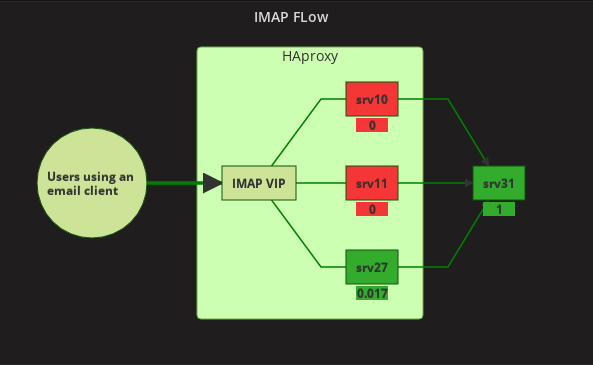
srv27 is the master in keepalived for IMAP.
Installing
A very good mirror, with updated versions for centos, here: http://au1.mirror.crc.id.au/repo/el7-extra/x86_64/
Creating a repo using this link:
/etc/yum.repos.d/dovecot_crc_id_au.repo
[dovecot_crc_id_au]
name=EL-$releasever Dovecot repo
baseurl=http://au1.mirror.crc.id.au/repo/el7-extra/x86_64/
enabled=0
gpgcheck=0
Installing
yum install dovecot --enablerepo dovecot_crc_id_au

Installed:
dovecot.x86_64 1:2.2.31-1.el7
Dependency Installed:
clucene-core.x86_64 0:2.3.3.4-11.el7
Changes in the configuration files for dovecot:
/etc/dovecot/dovecot-sql.conf.ext
driver = mysql
connect = host=localhost dbname=mail_db user=mail_user password=userpass

password_query = SELECT username as user, password, \
 '/data/mail/%d/%n' as userdb_home, \
 'maildir:/data/mail/%d/%n' as userdb_mail, \
 102 as userdb_uid, 102 as userdb_gid FROM mailbox \
 WHERE username = '%u' AND active = '1'

user_query = SELECT '/data/mail/%d/%n' as home, \
  'maildir:/data/mail/%d/%n' as mail, 102 AS uid, \
  102 AS gid, concat("*:storage=", quota) AS quota \
  FROM mailbox WHERE username = "%u" AND active = "1"
/etc/dovecot/conf.d/10-ssl.conf
ssl = yes

ssl_cert = </etc/letsencrypt/live/mail.mydomain.dom/fullchain.pem
ssl_key = </etc/letsencrypt/live/mail.mydomain.dom/privkey.pem
/etc/dovecot/conf.d/10-master.conf
haproxy_timeout = 5 secs
haproxy_trusted_networks = 192.168.121.0/24 192.168.122.0/24 192.168.123.0/24

service imap-login {
  inet_listener imap {
    #port = 143
  }
  inet_listener imaps {
    #port = 993
    #ssl = yes
  }

  inet_listener imap_haproxy {
      port = 10143
      haproxy = yes
  }
  inet_listener imaps_haproxy {
      port = 10993
      ssl = yes
      haproxy = yes
  }

service auth {

  unix_listener auth-userdb {
    mode = 0660
    user = vmail
  }

  # Postfix smtp-auth
  unix_listener /var/spool/postfix/private/auth {
  mode = 0660
  user = postfix
  group = postfix
  }

  # Auth process is run as this user.
  #user = $default_internal_user
}
/etc/dovecot/conf.d/10-auth.conf
disable_plaintext_auth = no

#!include auth-system.conf.ext
!include auth-sql.conf.ext
#!include auth-ldap.conf.ext
#!include auth-passwdfile.conf.ext
#!include auth-checkpassword.conf.ext
#!include auth-vpopmail.conf.ext
#!include auth-static.conf.ext
/etc/dovecot/conf.d/10-logging.conf
log_path = /var/log/dovecot.log
Installing dovecot-mysql:
yum install dovecot-mysql
/etc/dovecot/conf.d/auth-sql.conf
passdb {
  driver = sql

  # Path for SQL configuration file, see example-config/dovecot-sql.conf.ext
  args = /etc/dovecot/dovecot-sql.conf.ext
}

# "prefetch" user database means that the passdb already provided the
# needed information and there's no need to do a separate userdb lookup.
# <doc/wiki/UserDatabase.Prefetch.txt>

userdb {
  driver = prefetch
}

userdb {
  driver = sql
  args = /etc/dovecot/dovecot-sql.conf.ext
}
The namespace setting is now controlled in two config files:
/etc/dovecot/conf.d/10-mail.conf
mail_location = maildir:/data/mail/%d/%u

mail_uid = 102
mail_gid = 102

first_valid_uid = 102
last_valid_uid = 105
/etc/dovecot/conf.d/15-mailboxes.conf
# NOTE: Assumes "namespace inbox" has been defined in 10-mail.conf.
namespace inbox {
  # These mailboxes are widely used and could perhaps be created automatically:
  mailbox Drafts {
    special_use = \Drafts
  }
  mailbox Junk {
    special_use = \Junk
  }
  mailbox Trash {
    special_use = \Trash
  }

  # For \Sent mailboxes there are two widely used names. We'll mark both of
  # them as \Sent. User typically deletes one of them if duplicates are created.
  mailbox Sent {
    special_use = \Sent
  }
  mailbox "Sent Messages" {
    special_use = \Sent
  }

  # If you have a virtual "All messages" mailbox:
  #mailbox virtual/All {
  #  special_use = \All
  #  comment = All my messages
  #}

  # If you have a virtual "Flagged" mailbox:
  #mailbox virtual/Flagged {
  #  special_use = \Flagged
  #  comment = All my flagged messages
  #}
}
Setting dovecot to listen on only ipv4:
In /etc/dovecot/dovecot.conf:
listen = *
Then:
systemctl start dovecot && systemctl status dovecot -l
systemctl restart dovecot && systemctl status dovecot -l
tail -f -n 100 /var/log/messages
tail -f -n 100 /var/log/dovecot.log
systemctl enable dovecot
07. PostfixAdmin on srv4 (management server)
Installing postfixadmin on the management server (srv4)
Apache is already installed and running on the management server (srv4).
Downloading postfixadmin to /var/www/html and using it from there.
cd /var/www/html
wget https://sourceforge.net/projects/postfixadmin/files/postfixadmin/postfixadmin-3.1/postfixadmin-3.1.tar.gz
tar -xzf postfixadmin-3.1.tar.gz
ln -s postfixadmin-3.1 postfixadmin
Configuring the database settings
The database is on the mail server (srv31 - 192.168.122.123).
// Database Config
// mysql = MySQL 3.23 and 4.0, 4.1 or 5
// mysqli = MySQL 4.1+ or MariaDB
// pgsql = PostgreSQL
// sqlite = SQLite 3
$CONF['database_type'] = 'mysqli';
$CONF['database_host'] = '192.168.122.123';
$CONF['database_user'] = 'mail_user';
$CONF['database_password'] = 'userpass';
$CONF['database_name'] = 'mail_db';
systemctl restart httpd && systemctl status httpd
Creating the conf file /etc/httpd/conf.d/postfixadmin.conf
<VirtualHost *:80>
      DocumentRoot /var/www/html/postfixadmin
      ServerName postfixadmin.mydomain.dom
      ServerAlias postfixadmin
      ServerAdmin me@mydomain.dom
      ErrorLog /var/log/httpd/postfixadmin_error.log
      TransferLog /var/log/httpd/postfixadmin_access.log

      <Directory />
          Options +Indexes +FollowSymLinks
          DirectoryIndex index.html index.php
          AllowOverride All
          Order allow,deny
          Allow from all
          Require all granted
      </Directory>
</VirtualHost>
Adding a DNS CNAME
postfixadmin IN CNAME srv4
Then
ERROR: the templates_c directory doesn't exist or isn't writeable for the webserver
mkdir templates_c
chown -R apache:apache /var/www/html/postfixadmin
chmod -R 775 /var/www/html/postfixadmin
systemctl restart httpd && systemctl status httpd
(https://www.reddit.com/r/postfix/comments/4soepj/postfixadmin_install_templates_c_not_writeable/)
creating config.local.php in /var/www/html/postfixadmin
cp config.inc.php config.local.php
chown -R apache:apache *
chmod -R 755 *
systemctl restart httpd && systemctl status httpd
Installing php-imap
yum install php-imap
systemctl restart httpd && systemctl status httpd
Accessing the site - http://postfixadmin.mydomain.dom/setup.php and doing the initial passwords;
postfixadmin
change the setup password:
password

Create superadmin account
Admin: me@mydomain.dom
Password: someotherpass
08. Roundcube on the management server (srv4)
Getting Roundcube:
cd /var/www/html
wget https://github.com/roundcube/roundcubemail/releases/download/1.3.0/roundcubemail-1.3.0-complete.tar.gz
ln -s roundcubemail-1.3.0 webmail
Creating the database for roundcube:
mysql -u root -p
Enter password:
Welcome to the MariaDB monitor.  Commands end with ; or \g.
Your MariaDB connection id is 85647
Server version: 10.1.20-MariaDB MariaDB Server

Copyright (c) 2000, 2016, Oracle, MariaDB Corporation Ab and others.

Type 'help;' or '\h' for help. Type '\c' to clear the current input statement.

MariaDB [(none)]> CREATE DATABASE roundcubemail /*!40101 CHARACTER SET utf8 COLLATE utf8_general_ci */;
Query OK, 1 row affected (0.02 sec)

MariaDB [(none)]> GRANT ALL PRIVILEGES ON roundcubemail.* TO roundcube@localhost IDENTIFIED BY 'somepassword';
Query OK, 0 rows affected (0.07 sec)

MariaDB [(none)]> FLUSH PRIVILEGES;
Query OK, 0 rows affected (0.04 sec)

MariaDB [(none)]> quit
Bye
Importing schema:
mysql -u root -p roundcubemail < SQL/mysql.initial.sql
Enter password:
Installing it by accessing the site - http://webmail.mydomain.dom/installer
Setting up the timezone
vi /etc/php.ini
[Date]
; Defines the default timezone used by the date functions
; http://php.net/date.timezone
;date.timezone =
date.timezone = America/Toronto
09. clamav, amavisd-new, spamassassin
Installing them
yum install clamav amavisd-new clamav-update clamav-scanner-systemd spamassassin
clamav config
rpm -ql clamav-scanner
/etc/clamd.d/scan.conf
/usr/lib/tmpfiles.d/clamd.scan.conf
/var/run/clamd.scan
/var/run/clamd.scan/clamd.sock
Configuring clamd
/etc/clamd.d/scan.conf
LogFile /var/log/clamd.scan
LogFileMaxSize 2M
LogTime yes

LogSyslog no
PidFile /var/run/clamd.scan/clamd.pid
TemporaryDirectory /var/tmp
DatabaseDirectory /var/lib/clamav
LocalSocket /var/run/clamd.scan/clamd.sock
FixStaleSocket yes
TCPSocket 3310
TCPAddr 127.0.0.1
MaxConnectionQueueLength 30
systemctl start clamd@scan
systemctl enable clamd@scan
Configuring freshclam
vi /etc/freshclam.conf
DatabaseDirectory /var/lib/clamav
UpdateLogFile /var/log/freshclam.log
# Use system logger (can work together with UpdateLogFile).
# Default: no

LogSyslog no

HTTPProxyServer 192.168.122.124
HTTPProxyPort 3128
Testing:
clamdscan --fdpass /var/log/*
ERROR: Can't parse clamd configuration file /etc/clamd.conf
so I do this:
cp /etc/clamd.d/scan.conf /etc/clamd.conf
clamdscan --fdpass /var/log/*
/var/log/anaconda: OK
/var/log/audit: OK
/var/log/boot.log: OK
/var/log/btmp: OK
/var/log/chrony: OK
/var/log/clamd.scan: OK
/var/log/cron: OK
/var/log/cron-20170806: OK
/var/log/dmesg: OK
/var/log/dmesg.old: OK
/var/log/dovecot_debug.log: OK
/var/log/dovecot.log: OK
/var/log/fail2ban.log: OK
/var/log/firewalld: OK
/var/log/freshclam.log: OK
/var/log/grubby: OK
/var/log/grubby_prune_debug: OK
/var/log/lastlog: OK
/var/log/letsencrypt: OK
/var/log/maillog: OK
/var/log/maillog-20170806: OK
/var/log/messages: OK
/var/log/messages-20170806: OK
/var/log/ppp: OK
/var/log/secure: OK
/var/log/secure-20170806: OK
/var/log/spooler: OK
/var/log/spooler-20170806: OK
/var/log/tallylog: OK
/var/log/tuned: OK
/var/log/wpa_supplicant.log: OK
/var/log/wtmp: OK
/var/log/yum.log: OK

----------- SCAN SUMMARY -----------
Infected files: 0
Time: 0.993 sec (0 m 0 s)
Some info:
When installing ClamAV from EPEL to CentOS/Red Hat 7 becomes a nightmare…
How to Install ClamAV on CentOS 7
How to Install ClamAV on CentOS 7
Installing ClamAV on CentOS 7 and Using Freshclam
Configuring amavisd
/etc/amavisd/amavisd.conf
$mydomain = 'mydomain.dom';   # a convenient default for other settings
$do_syslog = 0;              # log via syslogd (preferred)

$LOGFILE = "/var/log/amavis/amavis.log";
@local_domains_maps = ( [".$mydomain"],".mydomain.dom",[".mydomain.org"],".mydomain.org",[".mydomain2.org"],".mydomain2.org",[".mydomain3.org"],".mydomain3.org" );  # list of all local domains

$myhostname = 'mail.mydomain.dom';

$virus_admin               = "alerts\@mydomain.dom";                    # notifications recip.

$mailfrom_notify_admin     = "alerts\@mydomain.dom";                    # notifications sender
$mailfrom_notify_recip     = "alerts\@mydomain.dom";                    # notifications sender
$mailfrom_notify_spamadmin = "alerts\@mydomain.dom";                    # notifications sender
$mailfrom_to_quarantine = ''; # null return path; uses original sender if undef
mkdir /var/log/amavis
touch /var/log/amavis/amavis.log
chown -R amavis:amavis /var/log/amavis
Adding the setings for amavisd to the master.cf configuration file for postfix
/etc/postfix/master.cf
127.0.0.1:10025 inet n - n - - smtpd
  -o content_filter=
  -o smtpd_client_restrictions=permit_mynetworks,reject
  -o smtpd_helo_restrictions=
  -o smtpd_sender_restrictions=
  -o smtpd_recipient_restrictions=permit_mynetworks,reject
  -o smtpd_restriction_classes=
  -o mynetworks=127.0.0.0/8,192.168.1.0/24,10.0.2.0/24,192.168.121.0/24,192.168.122.0/24,192.168.123.0/24
  -o smtpd_error_sleep_time=0
  -o smtpd_soft_error_limit=1001
  -o local_recipient_maps=
  -o relay_recipient_maps=
  -o strict_rfc821_envelopes=yes
  -o receive_override_options=no_unknown_recipient_checks,no_header_body_checks


amavis unix - - n - 2 smtp
  -o smtp_data_done_timeout=1200
  -o smtp_never_send_ehlo=yes
  -o disable_dns_lookups=yes
  -o smtp_send_xforward_command=yes
  -o fallback_relay=localhost:10025
and to the main.cf
/etc/postfix/main.cf
# for amavisd-new
content_filter = amavis:[127.0.0.1]:10024
strict_rfc821_envelopes = yes
Then enabling them for boot and start them
systemctl enable amavisd
systemctl enable spamassassin
systemctl stop postfix
systemctl start amavisd
systemctl start spamassassin
systemctl start postfix
Testing:
telnet localhost 10024
Trying ::1...
Connected to localhost.
Escape character is '^]'.
220 [::1] ESMTP amavisd-new service ready
ehlo localhost
250-[::1]
250-VRFY
250-PIPELINING
250-SIZE
250-ENHANCEDSTATUSCODES
250-8BITMIME
250-SMTPUTF8
250-DSN
250 XFORWARD NAME ADDR PORT PROTO HELO IDENT SOURCE
quit
221 2.0.0 [::1] amavisd-new closing transmission channel
Connection closed by foreign host.
telnet localhost 10025
Trying ::1...
telnet: connect to address ::1: Connection refused
Trying 127.0.0.1...
Connected to localhost.
Escape character is '^]'.
220 mail.mydomain.dom ESMTP Postfix
ehlo localhost
250-mail.mydomain.dom
250-PIPELINING
250-SIZE 10485760
250-ETRN
250-STARTTLS
250-AUTH PLAIN
250-AUTH=PLAIN
250-ENHANCEDSTATUSCODES
250-8BITMIME
250-DSN
250 SMTPUTF8
quit
221 2.0.0 Bye
Connection closed by foreign host.
Moving the logs out of syslog
/etc/rsyslog.conf
:programname, contains, "amavis"       /var/log/amavis/amavis.log
:programname, contains, "clamd"            /var/log/clamd.scan
Some info:
Amavisd-new, ClamAV and SpamAssassin
Centos 7 Postfix + Amavisd-new + ClamAV + Spamassassin
Setup amavisd-new with spamassassin and clamav with postfix
Amavisd-new, ClamAV and SpamAssassin with Postfix on CentOS 6.7 Server
10. HAProxy in front for IMAP
Adding in /etc/dovecot/conf.d/10-master-conf on srv31 for dovecot:
haproxy_timeout = 5 secs
haproxy_trusted_networks = 192.168.121.0/24 192.168.122.0/24 192.168.123.0/24

service imap-login {
  inet_listener imap {
    #port = 143
  }
  inet_listener imaps {
    #port = 993
    #ssl = yes
  }

  inet_listener imap_haproxy {
      port = 10143
      haproxy = yes
  }
  inet_listener imaps_haproxy {
      port = 10993
      ssl = yes
      haproxy = yes
  }
Adding in keepalived.conf:
on srv27
vrrp_instance imap {
    state MASTER
    interface ens160
    virtual_router_id 54
    priority 101
    advert_int 1

    virtual_ipaddress {
        192.168.122.122
    }

    track_script {
       check_haproxy
   }
}
on srv10:
vrrp_instance imap {
    state BACKUP
    interface ens160
    virtual_router_id 54
    priority 100
    advert_int 1

    virtual_ipaddress {
        192.168.122.122
    }

    track_script {
       check_haproxy
   }
}
on srv11:
vrrp_instance imap {
    state BACKUP
    interface ens160
    virtual_router_id 54
    priority 99
    advert_int 1

    virtual_ipaddress {
        192.168.122.122
    }

    track_script {
       check_haproxy
   }
}
Adding in haproxy.cfg:
on srv27:
#---------------------------------------------------------------------
# Dovecot IPMAS
#---------------------------------------------------------------------
listen srv27-imaps 192.168.122.122:993
   timeout client 1m
   no option http-server-close
   option log-health-checks
   stick store-request src
   stick-table type ip size 200k expire 30m
   mode tcp
   option tcplog
   server srv31 192.168.122.123:10993 check send-proxy-v2 inter 1900s
on srv10:
#---------------------------------------------------------------------
# Dovecot IPMAS
#---------------------------------------------------------------------
listen srv10-imaps 192.168.122.122:993
   timeout client 1m
   no option http-server-close
   option log-health-checks
   stick store-request src
   stick-table type ip size 200k expire 30m
   mode tcp
   option tcplog
   server srv31 192.168.122.123:10993 check send-proxy-v2 inter 1900s
on srv11:
#---------------------------------------------------------------------
# Dovecot IPMAS
#---------------------------------------------------------------------
listen srv11-imaps 192.168.122.122:993
   timeout client 1m
   no option http-server-close
   option log-health-checks
   stick store-request src
   stick-table type ip size 200k expire 30m
   mode tcp
   option tcplog
   server srv31 192.168.122.123:10993 check send-proxy-v2 inter 1900s
Guiding from here: Postfix Dovecot with HAproxy and other good info: Dovecot SSL Cert Problem.
Official docs: HAProxy Support
11. spf, DKIM, DMARC
spf DNS records
Created with spfwizard.net
domain1.dom. IN TXT “v=spf1 mx a ip4:123.123.123.123 a:some.provider.com -all”
domain2.dom. IN TXT “v=spf1 mx a ip4:123.123.123.123 a:some.provider.com -all”
domain3.dom. IN TXT “v=spf1 mx a ip4:123.123.123.123 a:some.provider.com -all”
Installing and configuring opendkim
yum install opendkim
systemctl start opendkim && systemctl status opendkim -l
systemctl enable opendkim
Creating the keys
cd /etc/opendkim/keys

opendkim-genkey --append-domain --bits=2048 --domain domain1.dom --selector=default
mv default.private domain1.dom.default.private
mv default.txt domain1.dom.default.txt
chown opendkim:opendkim domain1.dom.default.private

opendkim-genkey --append-domain --bits=2048 --domain domain2.dom --selector=default
mv default.private domain2.dom.default.private
mv default.txt domain2.dom.default.txt
chown opendkim:opendkim domain2.dom.default.private

opendkim-genkey --append-domain --bits=2048 --domain domain3.dom --selector=default
mv default.private domain3.dom.default.private
mv default.txt domain3.dom.default.txt
chown opendkim:opendkim domain3.dom.default.private
Configuring opendkim
/etc/opendkim.conf
Mode    sv
Syslog  yes
SyslogSuccess   yes
LogWhy  yes
UserID  opendkim:opendkim
Socket  inet:8891@localhost
Umask   002
SoftwareHeader  yes
Canonicalization       relaxed/simple
MinimumKeyBits  1024
KeyTable    /etc/opendkim/KeyTable
SigningTable  refile:/etc/opendkim/SigningTable
ExternalIgnoreList    refile:/etc/opendkim/TrustedHosts
InternalHosts refile:/etc/opendkim/TrustedHosts
OversignHeaders From
QueryCache    yes
KeyTable
/etc/opendkim/KeyTable
default._domainkey.domain1.dom domain1.dom:default:/etc/opendkim/keys/domain1.dom.default.private
default._domainkey.domain2.dom domain2.dom:default:/etc/opendkim/keys/domain2.dom.default.private
default._domainkey.domain3.dom domain3.dom:default:/etc/opendkim/keys/domain2.dom.default.private
SigningTable
/etc/opendkim/SigningTable
*@domain1.dom default._domainkey.domain1.dom
*@domain2.dom   default._domainkey.domain2.dom
*@domain3.dom default._domainkey.@domain3.dom
TrustedHosts
/etc/opendkim/TrustedHosts
192.168.122.0/24
123.123.123.123
Connecting with Postfix
Adding to main.cf:
/etc/postfix/main.cf
# DKIM
smtpd_milters = inet:localhost:8891
non_smtpd_milters       = $smtpd_milters
milter_default_action   = accept
DMARC and pypolicyd-spf
Creating DNS DMARC records using the DMARC Wizard from here: https://www.unlocktheinbox.com/dmarcwizard/
_dmarc.domain1.dom. IN TXT “v=DMARC1; p=reject; sp=reject; rua=mailto:postmaster@domain1.dom; ruf=mailto:postmaster@domain1.dom; rf=afrf; pct=100; ri=86400”
_dmarc.domain2.dom. IN TXT “v=DMARC1; p=reject; sp=reject; rua=mailto:postmaster@domain2.dom; ruf=mailto:postmaster@domain2.dom; rf=afrf; pct=100; ri=86400”
_dmarc.domain3.dom. IN TXT “v=DMARC1; p=reject; sp=reject; rua=mailto:postmaster@domain3.dom; ruf=mailto:postmaster@domain3.dom; rf=afrf; pct=100; ri=86400”
Installing pypolicyd-spf and opendmarc
yum install pypolicyd-spf opendmarc
Configuring pypolicyd-spf
Not rejecting, just adding a header:
/etc/python-policyd-spf/policyd-spf.conf
#  For a fully commented sample config file see policyd-spf.conf.commented

defaultSeedOnly = 0

HELO_reject = False
Mail_From_reject = False

PermError_reject = False
TempError_Defer = False

skip_addresses = 127.0.0.0/8,::ffff:127.0.0.0/104,::1,123.123.123.123
Adding policyd-spf to postfix:
/etc/postfix/master.cf
policy-spf unix  -      n       n        -       -      spawn
   user=nobody argv=/usr/bin/python /usr/libexec/postfix/policyd-spf
/etc/postfix/main.cf
policyd-spf_time_limit = 3600

smtpd_recipient_restrictions =
  permit_mynetworks,
  reject_non_fqdn_hostname,
  reject_non_fqdn_sender,
  reject_non_fqdn_recipient,
  reject_unauth_destination,
  reject_unauth_pipelining,
  reject_invalid_hostname,
  reject_rbl_client zen.spamhaus.org
  reject_rbl_client cbl.abuseat.org,
  reject_rbl_client dul.dnsbl.sorbs.net,
  check_policy_service unix:private/policyd-spf,
  permit
Configuring opendmarc
/etc/opendmarc.conf
AuthservID mail3.marthemed.org

IgnoreHosts /etc/opendmarc/ignore.hosts
/etc/opendmarc/ignore.hosts
localhost
127.0.0.1
123.123.123.123
Adding a Public Suffix List
/etc/opendmarc.conf
PublicSuffixList /etc/opendmarc/effective_tld_names.dat
cd /etc/opendmarc

/usr/bin/wget --no-check-certificate -q -N -P /etc/opendmarc https://publicsuffix.org/list/effective_tld_names.dat
chown opendmarc:opendmarc /etc/opendmarc/effective_tld_names.dat
Coonecting with postfix
/etc/postfix/main.cf

# DMARC
smtpd_milters           = inet:localhost:8891, inet:127.0.0.1:8893
non_smtpd_milters       = $smtpd_milters
milter_default_action   = accept
systemctl enable opendmarc
systemctl start opendmarc.service && systemctl status opendmarc.service -l
systemctl restart opendmarc.service && systemctl status opendmarc.service -l

systemctl restart postfix && systemctl status postfix -l
Some Info
DomainKeys Identified Mail (DKIM) Signatures
OpenDMARC
Installing OpenDMARC RPM via Yum with Postfix or Sendmail (for RHEL / CentOS / Fedora)
Postfix with SPF, DKIM and DMARC
Getting DKIM, DMARC and SPF to work with Postfix, OpenDKIM and OpenDMARC
Securing Your Postfix Mail Server with Greylisting, SPF, DKIM and DMARC and TLS
Configure SPF and DKIM With Postfix on Debian 8
12. Fail2ban
Installing fail2ban
yum install fail2ban
Adding to /etc/fail2ban/jail.d/local.conf
# ===========
# for postfix
# ===========

[postfix-postscreen]
enabled         = false
port            = smtp,465,submission
filter          = postfix-postscreen
logpath         = /var/log/maillog
action          = iptables-multiport[name=postfix-postscreen, port="smtp,smtps", protocol=tcp]
                  sendmail[name=postfix-postscreen, dest=admin@email.em]
bantime         = 3600
maxretry        = 5

[postfix-blocklist_de]
enabled         = true
port            = smtp,465,submission
filter          = postfix-blocklist_de
logpath         = /var/log/maillog
action          = iptables-multiport-log[name=postfix-blocklist_de, port="smtp,smtps", protocol=tcp]
                  sendmail[name=postfix-blocklist_de, dest=admin@email.em]
bantime         = 172800
maxretry        = 1


[postfix-spamhaus_org]
enabled         = true
port            = smtp,465,submission
filter          = postfix-spamhaus_org
logpath         = /var/log/maillog
action          = iptables-multiport-log[name=postfix-spamhaus_org, port="smtp,smtps", protocol=tcp]
                  sendmail[name=postfix-spamhaus_org, dest=admin@email.em]
bantime         = 172800
maxretry        = 1